As a virtual assistant, your daily activities consist of handling client tasks, emails, research, and creative work—often across several projects and time zones. Have you ever questioned where those hours go? In 2026, with remote work becoming standard and clients wanting exact billing, time tracking tools become indispensable for staying organized, proving your worth, and getting compensated fairly.
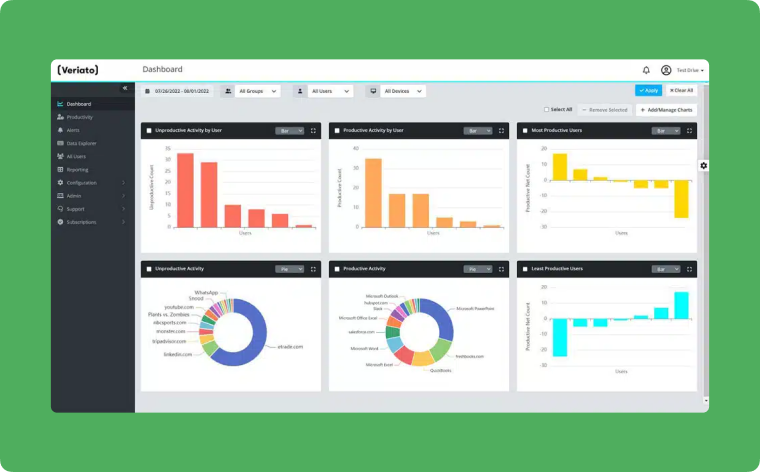
These apps offer more than just a timer. They help to capture billable hours, analyze productivity, distribute workloads, and set reminders to assist with high-focus tasks. For VAs with multiple clients and small business owners who are outsourcing support to VAs, the right tool offers transparency around billing and facilitates peace of mind for the VA. One time tracking tool that is gaining popularity is Controlio, an advanced activity monitoring platform that offers advanced visibility and analytics to track workflows and efficiency. Controlio offers seamless time capture along with smart analytics to help virtual assistants bill more ethically by tracking every minute.
Why Virtual Assistants Need Time Tracking in 2026
Remote gigs mean flexibility. However, there is still the uneasiness of under-billing and over-working.
Maximizing the value of your time tracking means capturing every billable moment. Clients appreciate transparency and trustworthy reports. You can identify time sinks, like wasted time on repetitive tasks or toggling between applications. In a crowded market, virtual assistants (VAs) can use trackable time, mobile access, project tagging, automated invoicing, and productivity score features as competitive advantages.
Wellness features, such as reminders to take a break or alerts for excessive screen time, help balance the focus on VAs. Ease of use and clearly stated privacy policies mean tracking can feel like support and not an invasion.
Key Features to Prioritize
Catering to VAs, the best tools come with the following features.
- Easy-to-use timers: They should include the ability to adjust time for overdue tasks. ● Project and client tagging: assign time to individual tasks or clients for precise invoicing. ● Mobile and desktop applications: record time anywhere and have it backed up across devices. ● Analytics: graphical reports of your productive and non-productive time recorded across periods. ● Integrations: connectors with Google Workspace, Asana, invoicing applications, and other tools for seamless workflows. ● Time/Achievement tracking: Simple reports for clients or staff. ● Affordable or Free Plans: Stratos for individual VAs, teams, or growing VAs. These features convert unstructured days into profit.
Best Time Tracking Apps for Virtual Assistants for 2026
After vetting user experiences on G2, Capterra, and other VA user reviews, I created the following list that focuses on freelancers, agencies, and remote workers.
Controlio tops the list for excellent user-friendly time tracking features. Its automated time logs, activity breakdowns, and productivity scoring help VAs illustrate their value and optimize their routine in the simplest way. Toggl Track is perfect for people who need to use time tracking for quick client reporting. It has a very user-friendly and fast interface that allows people to track time quickly. Clockify is great for virtual assistants on a budget. It has solid time sheets, a Pomodoro timer, and lets you budget your time. Harvest makes time tracking easier. You can add expenses, invoice your clients, and even track your budget for the project. This app has everything great for client-facing work. Hubstaff is solid for remote work; it has activity levels, screenshots, and GPS. It also has great location-based payroll tasks. My hours focus on billing ticket tracking and have a few other features that work well for freelancers and consultants. Time Doctor is great for self-improvement. It is great for people who need to be accountable to their clients in a precise way.
Other good choices include payroll integrations with QuickBooks, Timely as an AI capture alternative to Toggl, and Jibble as an emerging favorite with good free features.
Because user reviews change frequently, capture your free trials to discover your favorite tools matched to your workflow and client needs.
Getting Started and Maximizing Results
Choose a tool, set up some projects and clients, and track consistently for a week. Then check reports and look for patterns. When do you seem most focused? Are there certain tasks that take longer? Use your insights to make adjustments to your schedules, reprice workflow, or automate any tasks that don’t require thinking.
Tell clients that tracking is for fairness and accuracy. Using tracking for these reasons is a good way to say, “This helps me deliver top results efficiently,” and will strengthen your relationship with clients.
What Time Tracking Tech will look like for VAs
2026 will bring more predictive reminders to avoid overload, auto-assignment of task categories, and a more seamless integration with tools designed for Virtual Assistants (VAs). Tech that is mobile-first and emphasizes user privacy will be smooth and trustworthy.
Time tracking tools help virtual assistants to work smarter, bill more, and create more headroom in a busy industry.
Final Thoughts/Conclusion: Using the best time trackers, like Controlio, is more than just tracking time; it is about tracking progress. You will save time, make client relationships more clear and defined, and grow a virtual assistant business that will last.
Start experimenting today, as your most productive year is right around the corner.